> For the complete documentation index, see [llms.txt](https://city-protocol.gitbook.io/docs/llms.txt). Markdown versions of documentation pages are available by appending `.md` to page URLs; this page is available as [Markdown](https://city-protocol.gitbook.io/docs/platform/products/venzo.md).

# Venzo

Venzo, the flagship application for Curated Vaults and OTPs, screen by screen, from the marketplace to proof of reserves.

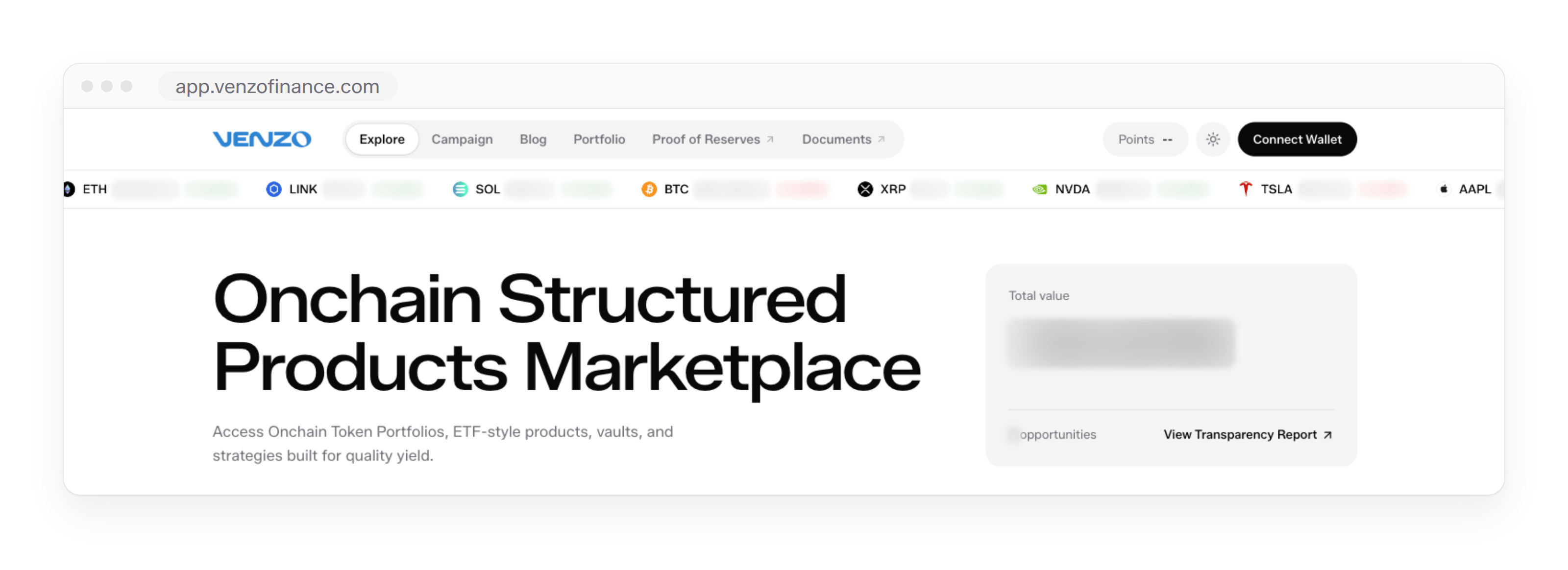
Venzo is City Protocol's flagship application for its products, which as of October 2026 are Curated Vaults and Onchain Token Portfolios (OTPs). It lists every product in one marketplace across networks, and each participant accesses products, subscribes, monitors and exits from a self-custodied wallet. Venzo also runs the Polis Points seasons, which include a single-layer referral component, and it links to an independent proof-of-solvency dashboard. The application runs at [app.venzofinance.com](https://app.venzofinance.com). The screens are shown as of 26 September 2026, with live figures such as rates, returns, TVL, prices and reserves blurred, and the application always shows the current values.

<figure><img src="https://3297077862-files.gitbook.io/~/files/v0/b/gitbook-x-prod.appspot.com/o/spaces%2FJxNp2waFk6hg1G4lEQZu%2Fuploads%2Fz3a2gNXZU2HVvnmEn0SE%2Fui-home.png?alt=media" alt="Venzo&#x27;s Explore page in a browser, with the navigation, the live price ticker, the marketplace headline and the Total value card"><figcaption><p>Venzo as of 26 September 2026. Explore opens on the navigation, the live price ticker and the Total value card.</p></figcaption></figure>

## One application for every product

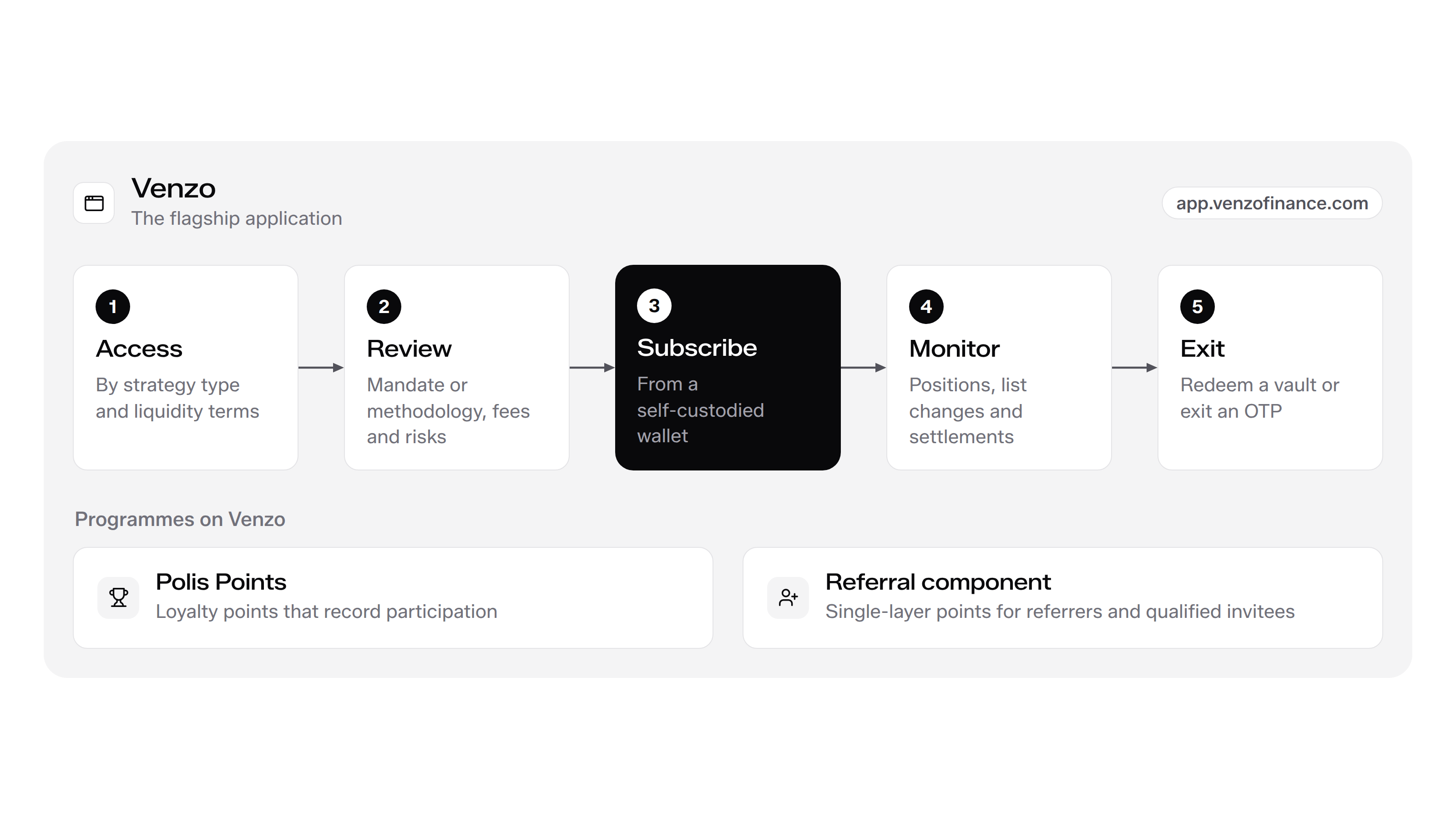
Venzo carries a product through its whole lifecycle.

* **Access:** Explore lists Curated Vaults and OTPs side by side, filtered by strategy type and liquidity terms.
* **Review:** Each product page shows the mandate or methodology, the fees, the terms and the risk disclosures before subscription.
* **Subscribe:** Every subscription is a transaction signed from the participant's self-custodied wallet, and each product applies its eligibility checks at subscription.
* **Monitor:** Portfolio gathers the wallet's positions, and each product page charts performance and records allocations or list changes.
* **Exit:** Curated Vault positions redeem through the vault's settlement window, and OTP holdings exit from the participant's own smart account.

<figure><img src="https://3297077862-files.gitbook.io/~/files/v0/b/gitbook-x-prod.appspot.com/o/spaces%2FJxNp2waFk6hg1G4lEQZu%2Fuploads%2Fi1SfwXSvL0lvcSHCxiu0%2Ffig-venzo-v21.png?alt=media" alt="Access, review, subscribe, monitor and exit on Venzo"><figcaption><p>One application for the whole product lifecycle, from access to exit.</p></figcaption></figure>

**Self-custodied wallets:** Venzo is the interface to the product contracts. The participant connects a self-custodied wallet with Connect Wallet, and every deposit, purchase, withdrawal request and exit is a transaction that the wallet signs. A Curated Vault subscription ends with Receipt Tokens in that wallet, and an OTP purchase delivers every constituent into a smart account that the wallet owns.

**One marketplace across networks:** Explore lists every product in one place, whatever network it runs on, and each card and product page names its networks. As of October 2026, the Index OTPs run on BNB Chain and Base, and the Curated Vaults run on networks that include Ethereum and Arbitrum. Curated Vaults apply chain abstraction, so a participant subscribes from a supported network while strategy execution and NAV settlement stay on the vault's execution network, as set out in [Cross-chain architecture](/docs/security/cross-chain-architecture.md).

<table><thead><tr><th width="206.44140625">Area</th><th>What it holds</th></tr></thead><tbody><tr><td>Explore</td><td>The marketplace: total value, new products, filters and every Curated Vault and OTP</td></tr><tr><td>Product pages</td><td>One page per product, with subscription, performance, holdings or allocations, and disclosures</td></tr><tr><td>Portfolio</td><td>The connected wallet's deposits, earnings, profit and loss and positions</td></tr><tr><td>Campaign</td><td>The current Polis Points season: overview, formula, eligible strategies and referral</td></tr><tr><td>Proof of Reserves</td><td>The independent proof-of-solvency dashboard</td></tr><tr><td>Documents</td><td>The documentation</td></tr></tbody></table>

## Explore

Explore is the landing page and the marketplace.

### Navigation and price ticker

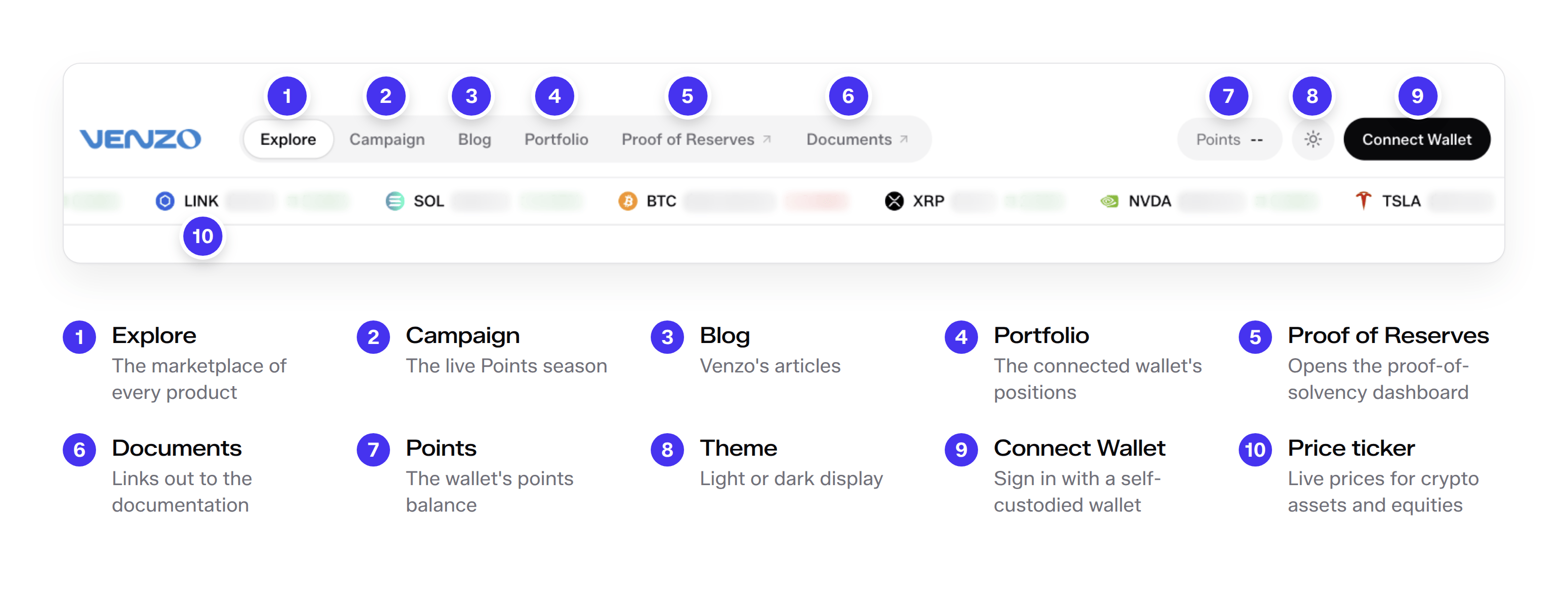
The navigation bar carries six items. Explore, Campaign, Blog and Portfolio open inside Venzo, and Proof of Reserves and Documents link out. On the right, the Points pill shows the wallet's points balance, the theme switch changes between light and dark, and Connect Wallet signs in with a self-custodied wallet. Below the bar, a live ticker runs prices for crypto assets and equities.
<figure><img src="https://3297077862-files.gitbook.io/~/files/v0/b/gitbook-x-prod.appspot.com/o/spaces%2FJxNp2waFk6hg1G4lEQZu%2Fuploads%2FEYiaslTxfsOo7Ma8wBz5%2Fui-nav.png?alt=media" alt="Venzo&#x27;s navigation bar and price ticker with ten numbered callouts, from Explore to Connect Wallet and the ticker"><figcaption><p>The navigation. Explore, Campaign, Blog and Portfolio open inside Venzo, Proof of Reserves and Documents link out, and Connect Wallet signs in with a self-custodied wallet.</p></figcaption></figure>

### Total value and new products

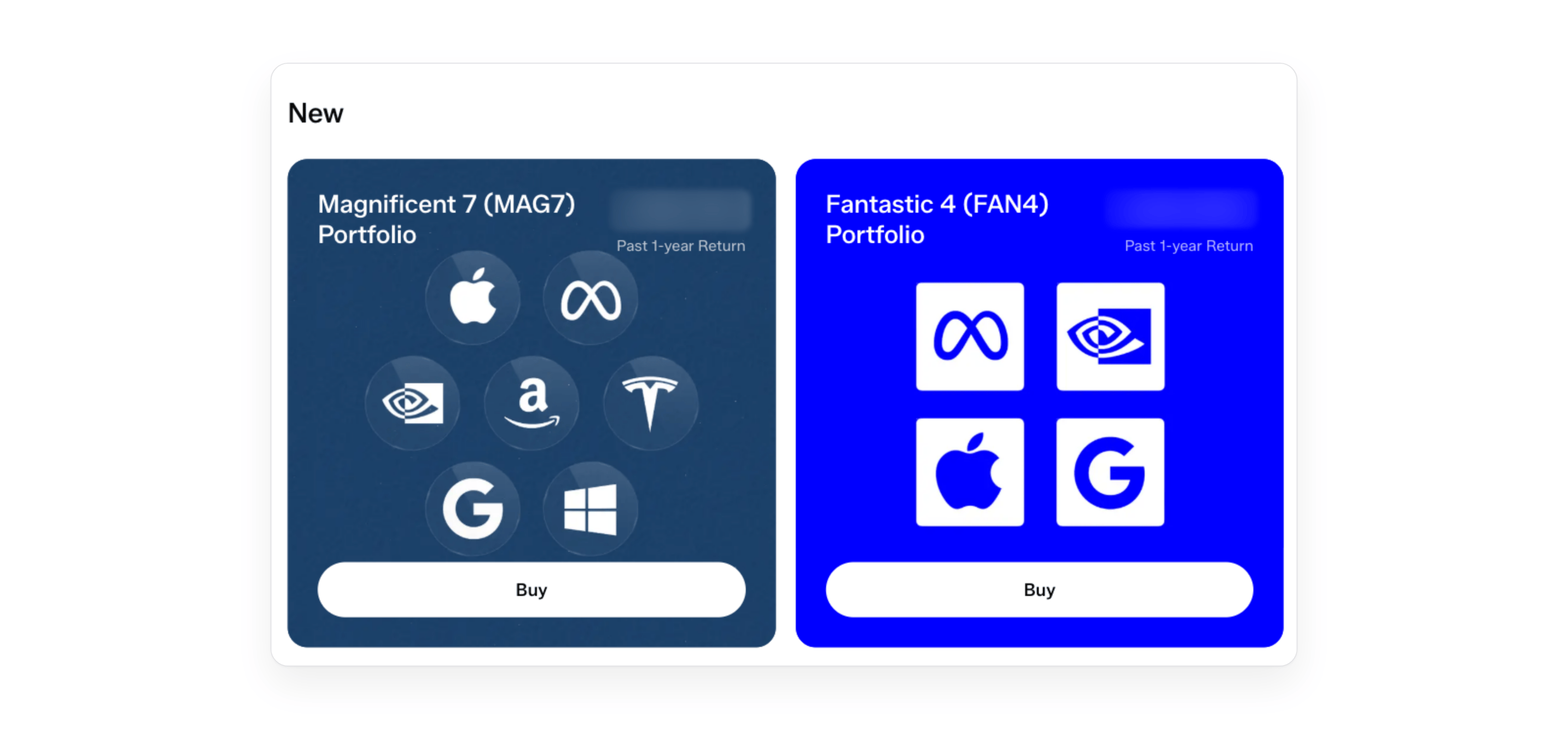
At the top of Explore, the Total value card shows the total value across Venzo's products and the number of opportunities open, and View Transparency Report links to the transparency report. The New row below it features the latest products as large cards, each with its past 1-year return and a Buy button.

<figure><img src="https://3297077862-files.gitbook.io/~/files/v0/b/gitbook-x-prod.appspot.com/o/spaces%2FJxNp2waFk6hg1G4lEQZu%2Fuploads%2Fh22IT3J0CB2rN7ZGfQPV%2Fui-new.png?alt=media" alt="The New row on Explore with the Magnificent 7 and Fantastic 4 portfolio cards, each with its past 1-year return and a Buy button"><figcaption><p>The New row features the latest products, here Index OTPs, each with its past 1-year return.</p></figcaption></figure>

### Filters and product cards

Two filters narrow the marketplace.

* **Strategy type:** Selects a product family, Curated Vaults or OTPs, or one strategy: Arbitrage, Market Neutral, Private Credit or RWA.
* **Liquidity:** Selects exit terms: Flexible for exit at any time, or a Weekly, Monthly or Epoch schedule.

The Curated Vaults section lists every Curated Vault. Each card shows the curator's mark, the vault name and a summary of the mandate, chips for the strategy type and the redemption schedule, the headline rate, labelled Expected Net APR or Net APY as the vault reports it, and a Deposit button.

The Onchain Token Portfolios section lists the OTPs. Each card shows the OTP type, the portfolio name and a summary of the basket, an OTP chip and a liquidity chip, the basket's past 1-year return, or its return over the available history for a younger basket, and a Buy button.

<figure><img src="https://3297077862-files.gitbook.io/~/files/v0/b/gitbook-x-prod.appspot.com/o/spaces%2FJxNp2waFk6hg1G4lEQZu%2Fuploads%2F09aSzU9PHteHgDVjC9Er%2Fui-otp-cards.png?alt=media&#x26;token=8b22662f-5e70-449a-9f6b-3bbbb86837e7" alt="Two Index OTP cards in the Onchain Token Portfolios section, with numbered callouts on the type, the name, the chips, the return and the Buy button"><figcaption><p>Index OTP cards. Each card shows the type, the basket, the past 1-year return and a Buy button.</p></figcaption></figure>

Guru OTP cards also appear in the section. As of October 2026 the first Guru OTP, the Pelosi Portfolio+, is live, and the Jim Simons and Michael Burry portfolios are listed as Launching soon. A Guru OTP tracks the disclosed positions of a well-known investor or manager from third-party public sources, such as periodic transaction reports and quarterly Form 13F filings. Guru OTPs replicate positions disclosed in public filings and are not affiliated with or endorsed by the individuals or firms they track.

<figure><img src="https://3297077862-files.gitbook.io/~/files/v0/b/gitbook-x-prod.appspot.com/o/spaces%2FJxNp2waFk6hg1G4lEQZu%2Fuploads%2FF4BUaHFF5cfZ6PgGLkfd%2Fui-guru-cards.png?alt=media" alt="Guru OTP cards in the Onchain Token Portfolios section"><figcaption><p>Guru OTP cards. The Pelosi Portfolio+ is live, and the next Guru OTPs are listed as Launching soon.</p></figcaption></figure>

## An OTP product page

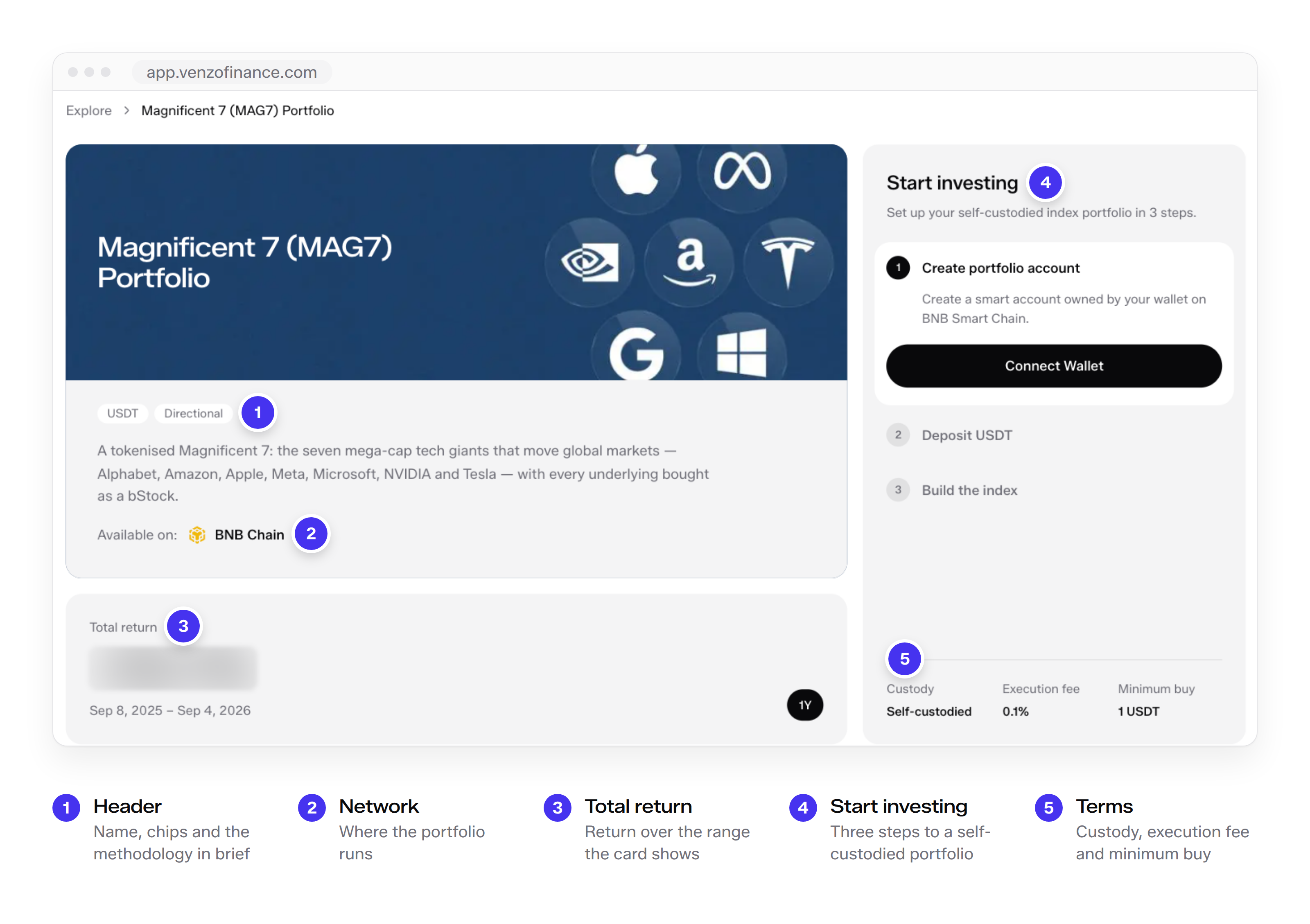
Every OTP has a product page with the same layout. The Magnificent Seven Index OTP, listed on Venzo as Magnificent 7 (MAG7) Portfolio, runs on BNB Chain, is funded in USDT and holds seven bStocks. The Fantastic Four Index OTP runs on Base, is funded in USDC and holds Coinbase Tokenized Stocks. The account model behind the page is set out in [How OTPs work](/docs/platform/product-mechanics/how-otps-work.md).

<figure><img src="https://3297077862-files.gitbook.io/~/files/v0/b/gitbook-x-prod.appspot.com/o/spaces%2FJxNp2waFk6hg1G4lEQZu%2Fuploads%2Fb2oyHfTIdfFQ8WPIYj5X%2Fui-otp-page.png?alt=media" alt="The Magnificent 7 (MAG7) Portfolio page with callouts on the header, the network, the total return, the Start investing panel and its terms"><figcaption><p>The product page of the Magnificent Seven Index OTP on BNB Chain.</p></figcaption></figure>

### Header and total return

The header names the portfolio, shows its funding currency and strategy chips, describes the basket and names the network it runs on. The Total return card shows the basket's return over the range the card states. The return of an OTP is the market performance of its constituents, so the card reports how the basket performed over that range.

### Start investing

The Start investing panel sets up a self-custodied index portfolio in three steps.

1. **Create portfolio account:** The account factory derives a smart account following the ERC-4337 standard on the portfolio's network, owned by the participant's wallet from creation, and the first operation from it deploys it. City Protocol never holds the owner key, and its automation signer acts only within the Approval and Trade permissions the participant grants.
2. **Deposit USDT:** The participant funds the smart account in the portfolio's funding currency.
3. **Build the index:** The eligibility policy is checked, exact-amount approvals go first where needed, and one transaction then buys every constituent at the weights the methodology sets and delivers them into the smart account.

The footer states the terms. Custody is self-custodied. The execution fee is the OTP fee of 0.1% of buy and sell volume, charged from Q4 2026, as set out in [Fees](/docs/platform/product-mechanics/fees.md). The minimum buy is the smallest purchase the portfolio accepts: 1 USDT for the Magnificent Seven Index OTP and 1 USDC for the Fantastic Four Index OTP. Purchases of the Magnificent Seven Index OTP execute against live bStocks reference prices with a price guard, and the Fantastic Four Index OTP executes through concentrated liquidity with independent stock price feeds as the price guard.

<figure><img src="https://3297077862-files.gitbook.io/~/files/v0/b/gitbook-x-prod.appspot.com/o/spaces%2FJxNp2waFk6hg1G4lEQZu%2Fuploads%2FtQ6Eh6MsAnPr4syfB3yF%2Fui-otp-start.png?alt=media&#x26;token=6dd96f38-c397-4d17-813d-988d1737e6c3" alt="The Start investing panel with its three steps and its custody, execution fee and minimum buy terms called out"><figcaption><p>Start investing. The panel creates a smart account owned by the participant's wallet, funds it in USDT and buys every constituent into it in one transaction.</p></figcaption></figure>

Each OTP inherits the eligibility restrictions of its constituents. The live OTPs are available only to eligible participants outside the United States and the other restricted jurisdictions listed in the [Terms & Conditions](/docs/legal/terms-and-conditions.md), and OTPs are not offered to residents of the Republic of Korea unless authorized as required under Korean law.

### Portfolio tabs

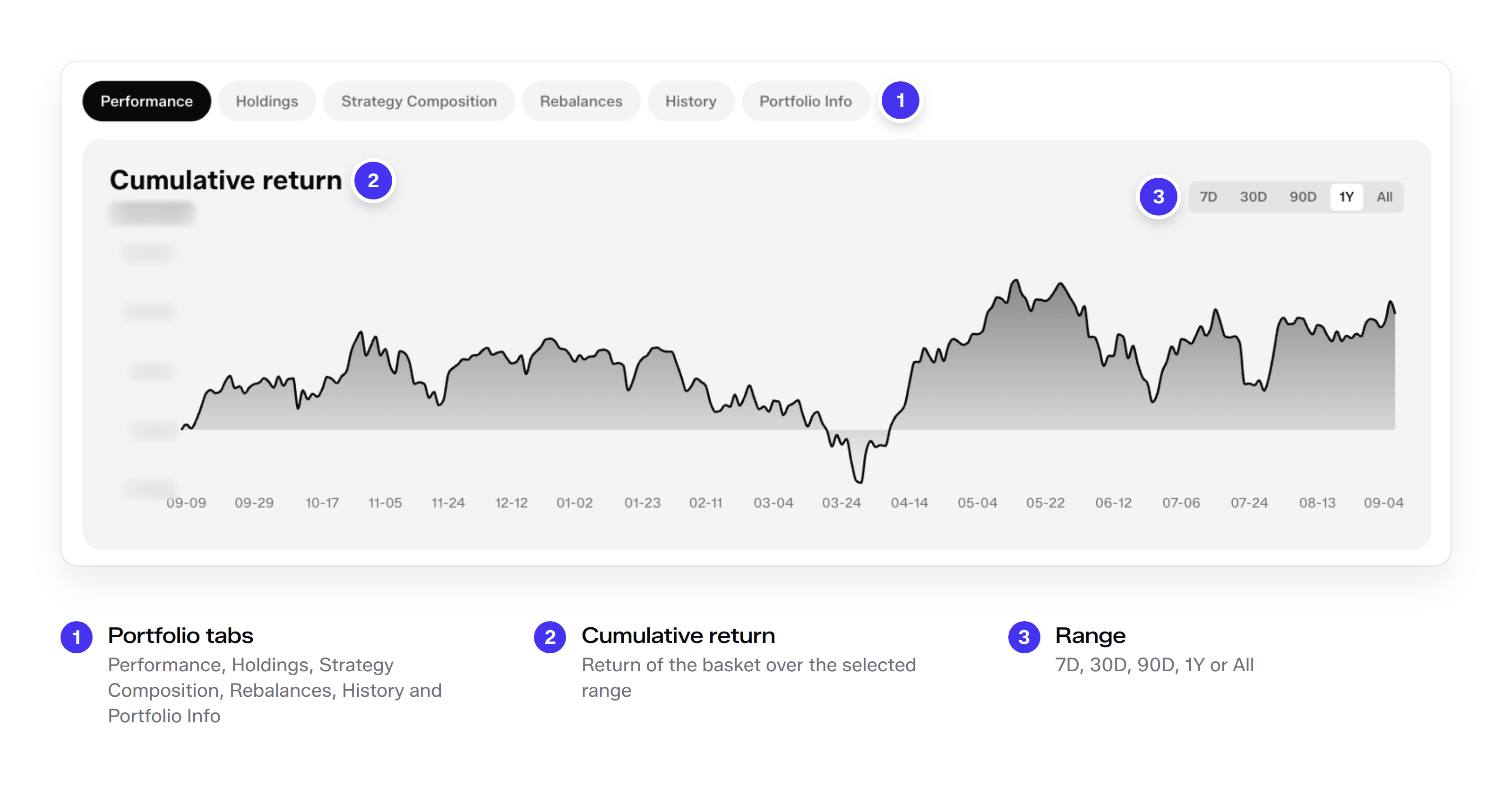
Below the header, six tabs cover the portfolio.

| Tab                  | What it shows                                                                                                                    |
| -------------------- | -------------------------------------------------------------------------------------------------------------------------------- |
| Performance          | The basket's cumulative return over 7D, 30D, 90D, 1Y or All                                                                      |
| Holdings             | Live balances in the participant's smart account, valued at independent reference prices; empty until a portfolio account exists |
| Strategy Composition | Each constituent at the weight the methodology sets at purchase                                                                  |
| Rebalances           | Every change to the constituent list, with its date, source, trades and positions                                                |
| History              | Confirmed onchain buys, sells and list changes from the participant's smart account                                              |
| Portfolio Info       | The portfolio factsheet                                                                                                          |

<figure><img src="https://3297077862-files.gitbook.io/~/files/v0/b/gitbook-x-prod.appspot.com/o/spaces%2FJxNp2waFk6hg1G4lEQZu%2Fuploads%2FpsXSWgSpaTTYlFOn77UL%2Fui-otp-performance.png?alt=media" alt="The Performance tab of an OTP with the cumulative return chart, the range selector and the portfolio&#x27;s six tabs"><figcaption><p>The Performance tab charts the basket's cumulative return over the selected range.</p></figcaption></figure>

### Composition and list changes

The Strategy Composition tab lists the seven constituents of the Magnificent Seven Index OTP at one seventh each, shown as 14.29% or 14.28% after rounding, with the date of the list entry that set them. These are the weights at purchase. After purchase, the weights follow the market: an OTP position is the set of token balances in the participant's account, and the Holdings tab values those balances at independent reference prices.

<figure><img src="https://3297077862-files.gitbook.io/~/files/v0/b/gitbook-x-prod.appspot.com/o/spaces%2FJxNp2waFk6hg1G4lEQZu%2Fuploads%2FNm8Jgkhee8qsxCJr6VrM%2Fui-otp-composition.png?alt=media&#x26;token=fd915ff8-8294-440c-ba2b-b6c611d5c4ce" alt="The Strategy Composition tab listing seven constituents at one seventh each, with the date of the list entry that set the weights"><figcaption><p>Strategy Composition lists each constituent at the weight the methodology sets at purchase.</p></figcaption></figure>

The Rebalances tab is the record of list changes. Each entry states the date, the change and the source or rule behind it, the network, the number of trades and every position with its weight before and after. The first entry records the inception of the Magnificent Seven equal-weight methodology on 26 August 2026, when seven reviewed bStocks entered at one seventh each. As of October 2026, the Index OTPs hold fixed lists, and a later entry appears only when the published constituent rule adds or drops a name. A Guru OTP's list changes when a new disclosure is published. Each change is published on the product page before it executes.

<figure><img src="https://3297077862-files.gitbook.io/~/files/v0/b/gitbook-x-prod.appspot.com/o/spaces%2FJxNp2waFk6hg1G4lEQZu%2Fuploads%2FGZAwySgtR4jgZqeksBAw%2Fui-otp-listchange.png?alt=media" alt="One Rebalances entry recording the methodology&#x27;s inception, with seven new positions each moving from 0% to one seventh"><figcaption><p>The Rebalances tab records every list change. The first entry records the inception of the methodology on 26 August 2026.</p></figcaption></figure>

### Portfolio factsheet

Portfolio Info holds the portfolio factsheet: structure, constituents, funding currency, network, fees, withdrawals, known limitations and risks. Its structure row states the model in one line: a self-custodied index portfolio, one smart account per participant and no pooled vault shares. Withdrawals are owner-controlled. Exit draws on constituents the participant already holds, so one transaction converts the basket back to one asset, any constituent can be sold on its own, and exit stays available while a product is paused.

<figure><img src="https://3297077862-files.gitbook.io/~/files/v0/b/gitbook-x-prod.appspot.com/o/spaces%2FJxNp2waFk6hg1G4lEQZu%2Fuploads%2FTJO6FHRlQQlC521RfjLs%2Fui-otp-factsheet.png?alt=media" alt="The Portfolio factsheet with rows for structure, constituents, funding currency, network, fees, withdrawals, known limitations and risks"><figcaption><p>The Portfolio factsheet in Portfolio Info.</p></figcaption></figure>

## A Curated Vault product page

Every Curated Vault has a product page with the same layout. Delta-Neutral Prime USD, curated by Liquid Alpha, serves as the example. The contracts behind the page are set out in [How Curated Vaults work](/docs/platform/product-mechanics/how-curated-vaults-work.md).

<figure><img src="https://3297077862-files.gitbook.io/~/files/v0/b/gitbook-x-prod.appspot.com/o/spaces%2FJxNp2waFk6hg1G4lEQZu%2Fuploads%2F9VZbLrXC5jusmkZzh3SU%2Fui-vault-page.png?alt=media&#x26;token=a005811a-2b33-4879-a6e1-12530263ce0f" alt="The Delta-Neutral Prime USD page with callouts on the curator, the name, the protocol dashboard link, the document links, the statistics, the withdrawal wait and the Deposit panel"><figcaption><p>The product page of Delta-Neutral Prime USD, curated by Liquid Alpha.</p></figcaption></figure>

### Header and statistics

The header shows the curator's mark, the networks the vault is available on, the vault name with its deposit asset and strategy type, and a summary of the mandate. View Protocol Dashboard links out to the strategy's protocol dashboard, and five links open the Yield Simulator, the Risk Disclosure, the vault's Documents, its Legal Terms and its Audits. The statistics card shows the Expected Net APR and the TVL, the deposit asset, the Receipt Token, listed as Shares (aprimeUSD for Delta-Neutral Prime USD), and the Minimum Withdrawal Wait, seven days for Delta-Neutral Prime USD, above the vault's disclaimer.

### Deposits, withdrawals and requests

The panel on the right has three tabs.

* **Deposit:** The participant enters an amount of the deposit asset, with MAX and 25%, 50%, 75% and 100% shortcuts against the wallet balance. The panel previews the Receipt Tokens the deposit mints and an estimated yield over one month and one year. The vault checks access, limits, product status and pause state, and a deposit that fails a check reverts.
* **Withdraw:** The participant enters the Receipt Tokens to redeem, with MAX against the wallet's shares, and the panel previews the USDC the redemption pays.
* **Requests:** The tab lists the requests the connected wallet has submitted.

The request rule box on the Withdraw tab states the vault's terms. For Delta-Neutral Prime USD, a request becomes eligible after a minimum wait of seven days and is then processed daily, and it remains valid for 14 days from submission. Processing time depends on the vault's liquidity, because a redemption claim becomes payable only once idle settlement assets cover the whole settled epoch. A redemption request cannot be cancelled once submitted; submitting a new request replaces it and restarts the waiting period.

<figure><img src="https://3297077862-files.gitbook.io/~/files/v0/b/gitbook-x-prod.appspot.com/o/spaces%2FJxNp2waFk6hg1G4lEQZu%2Fuploads%2FHnFiAaOiruubqtjmqIgK%2Fui-vault-deposit.png?alt=media&#x26;token=febe1fc3-99c5-4b96-b2b9-ce2331925cad" alt="The Deposit and Withdraw tabs side by side, with callouts on the amounts, the previews, the estimated yield and the request rule"><figcaption><p>Deposit beside Withdraw. The request rule box states the withdrawal terms of the vault.</p></figcaption></figure>

### Performance and share price

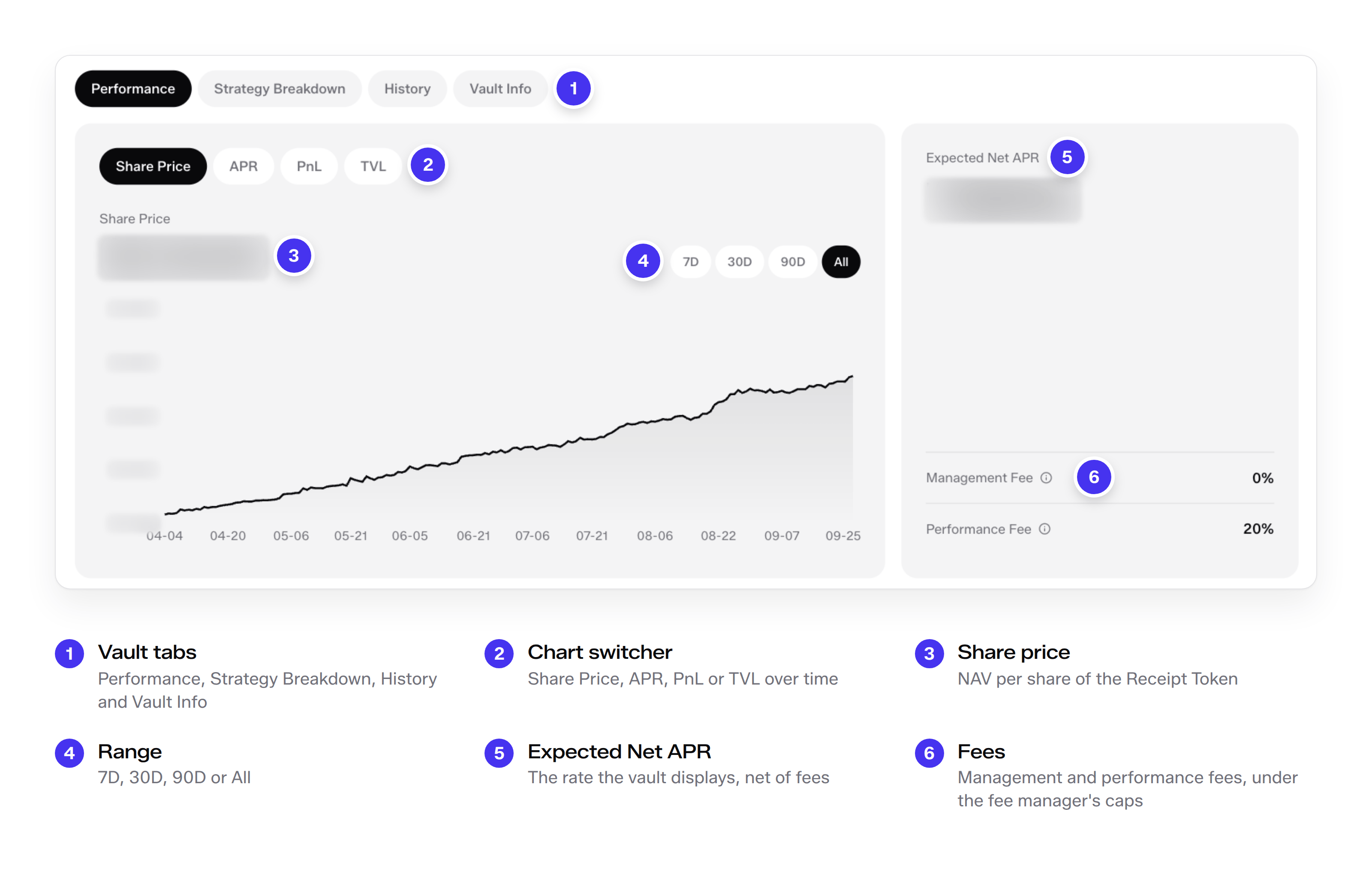
The Performance tab charts the vault over 7D, 30D, 90D or All and switches between Share Price, APR, PnL and TVL. The share price is the vault's NAV per share. At each valuation point, NAV is the verified value of the vault's assets less its liabilities and accrued fees, and the share price is NAV divided by the Receipt Tokens outstanding. In Delta-Neutral Prime USD the return accrues in the share price: the participant's Receipt Token balance stays the same, and each Receipt Token is worth more as NAV per share rises.

Beside the chart, the fee card shows the Expected Net APR and the vault's management and performance fees, which the curator sets within the hard caps of the fee manager, as set out in [Fees](/docs/platform/product-mechanics/fees.md).

<figure><img src="https://3297077862-files.gitbook.io/~/files/v0/b/gitbook-x-prod.appspot.com/o/spaces%2FJxNp2waFk6hg1G4lEQZu%2Fuploads%2FxIBIt0S7wc7GXo9zRlLC%2Fui-vault-performance.png?alt=media" alt="The Performance tab with the share price chart, the chart switcher, the range selector, the Expected Net APR and the fee card"><figcaption><p>The Performance tab. The share price is the vault's NAV per share.</p></figcaption></figure>

### Strategy breakdown

The Strategy Breakdown tab lists where the vault's assets sit: the idle USDC held in the vault and each strategy allocation, in US dollars and as a share of the vault. Idle assets meet liquid redemptions and claims, and assets reserved for claims cannot be allocated to a strategy. Allocated capital reaches only allowlisted strategies, within the per-strategy and total debt caps that the strategy manager enforces.

<figure><img src="https://3297077862-files.gitbook.io/~/files/v0/b/gitbook-x-prod.appspot.com/o/spaces%2FJxNp2waFk6hg1G4lEQZu%2Fuploads%2FOcMOJzPrBcVN8pdRZH9L%2Fui-vault-allocation.png?alt=media" alt="The Strategy Breakdown tab listing idle USDC and each strategy allocation in US dollars and as a share of the vault"><figcaption><p>Strategy Breakdown shows the idle balance and each strategy's allocation.</p></figcaption></figure>

### Vault information and factsheet

Vault Info has three views: About, Factsheet and Provider. About describes the strategy and shows three performance highlights: the annualized net yield since inception, the 30-day Sharpe ratio and the maximum drawdown since inception.

<figure><img src="https://3297077862-files.gitbook.io/~/files/v0/b/gitbook-x-prod.appspot.com/o/spaces%2FJxNp2waFk6hg1G4lEQZu%2Fuploads%2FOlnpA5EG8XDol1JxuqUA%2Fui-vault-about.png?alt=media" alt="The About view of Vault Info with the strategy description and three performance highlights: net yield since inception, Sharpe ratio and maximum drawdown"><figcaption><p>Vault Info, About. The strategy in the curator's words and its performance highlights.</p></figcaption></figure>

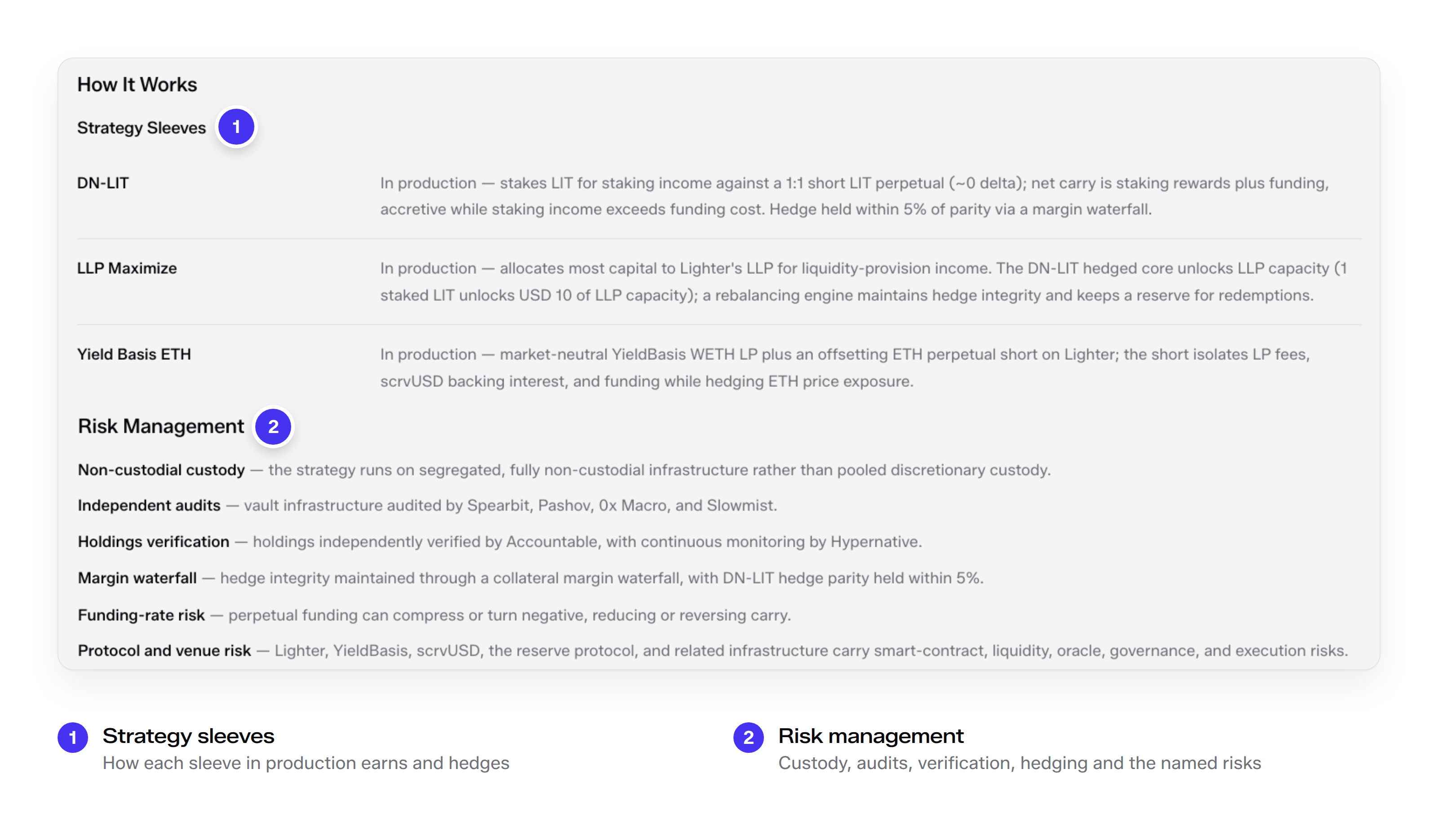
How It Works lists the strategy sleeves in production and how each one earns and hedges. Risk Management sets out how the strategy is held, audited, verified and hedged, and names its funding-rate, protocol and venue risks.

<figure><img src="https://3297077862-files.gitbook.io/~/files/v0/b/gitbook-x-prod.appspot.com/o/spaces%2FJxNp2waFk6hg1G4lEQZu%2Fuploads%2FiyQFlNPxfc0Xu236U0yi%2Fui-vault-sleeves.png?alt=media" alt="How It Works with the strategy sleeves in production, and the Risk Management list"><figcaption><p>Vault Info, How It Works and Risk Management. Each sleeve, how it earns and hedges, and the named risks.</p></figcaption></figure>

The factsheet sets out the vault in one table: the strategy; the curator and City Protocol as infrastructure partner; the inception date; custody, security, governance and continuous monitoring; the funding currency, the Receipt Token ticker and the network; the largest allocation, the production sleeves and the primary venue; capacity, fees and minimum investment; the liquidity and redemption terms; and the named risks. Each vault is configured before launch, and its configuration is disclosed on its product page.

<figure><img src="https://3297077862-files.gitbook.io/~/files/v0/b/gitbook-x-prod.appspot.com/o/spaces%2FJxNp2waFk6hg1G4lEQZu%2Fuploads%2FMzRw8hDA172D6Jyg7Daa%2Fui-vault-factsheet.png?alt=media" alt="The Delta-Neutral Prime USD factsheet as one table, from strategy and curator to liquidity terms and risks, with seven groups of rows called out"><figcaption><p>The vault factsheet in Vault Info, shown as one table.</p></figcaption></figure>

## Portfolio

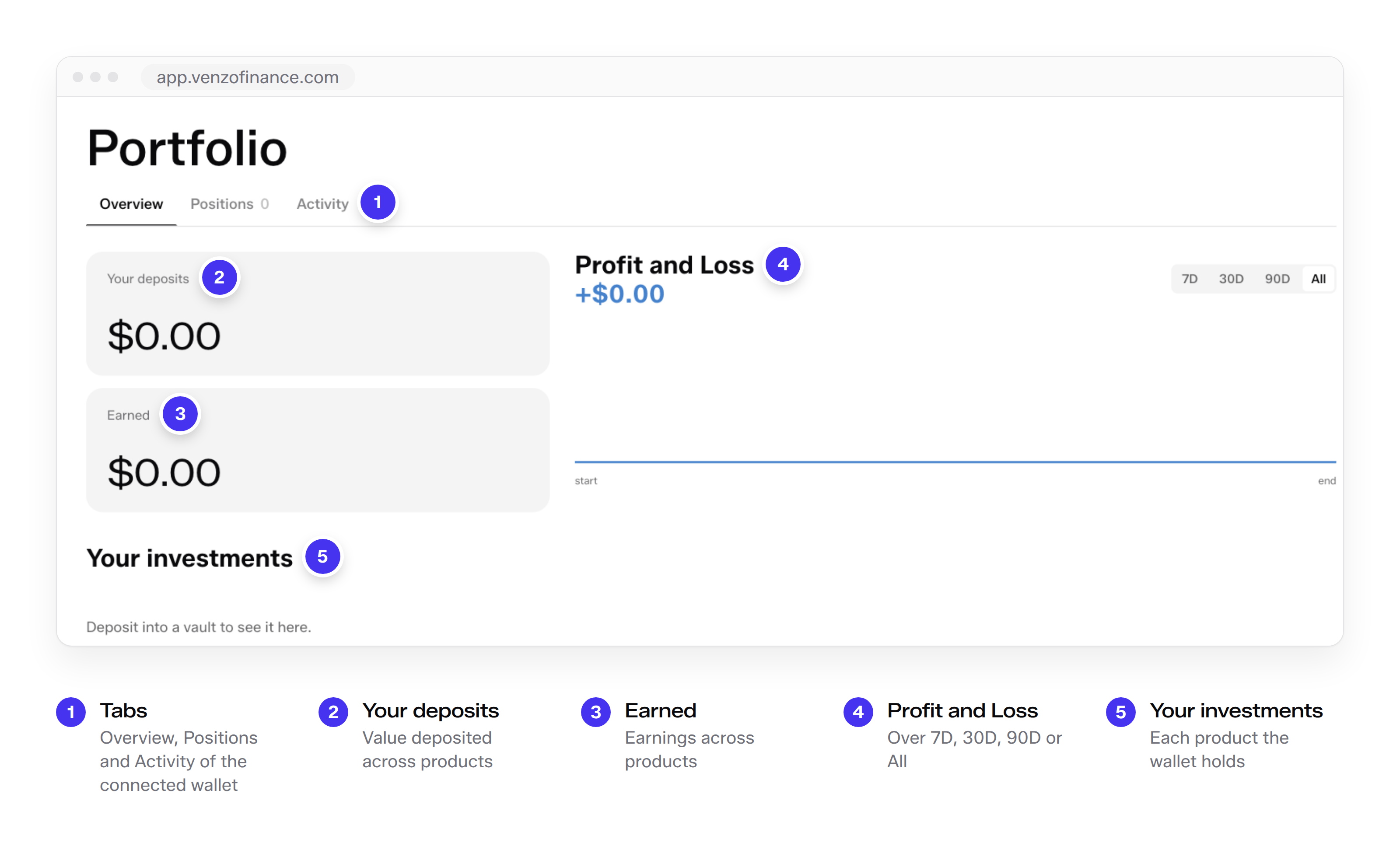
Portfolio gathers the connected wallet's positions. The Overview tab shows the wallet's deposits, its earnings and a profit and loss chart over 7D, 30D, 90D or All, and lists each investment under Your investments. The Positions and Activity tabs list the wallet's positions and its history. For an OTP, the Holdings tab on the product page shows the live balances in the participant's smart account.

<figure><img src="https://3297077862-files.gitbook.io/~/files/v0/b/gitbook-x-prod.appspot.com/o/spaces%2FJxNp2waFk6hg1G4lEQZu%2Fuploads%2F5b9X7q07ZhMEJVNkc9uA%2Fui-portfolio.png?alt=media" alt="The Portfolio page with the Overview, Positions and Activity tabs, the deposits and earnings cards, the profit and loss chart and Your investments"><figcaption><p>Portfolio, shown without a connected wallet.</p></figcaption></figure>

## Campaign

Campaign runs the current Polis Points season. Polis Points are loyalty points that record eligible participation in City Protocol products: they have no cash value, cannot be sold, transferred or exchanged for cash, and carry no entitlement or promise to receive $CIT or any other asset. The page has four tabs: Overview, Formula, Eligible Strategies and Referral.

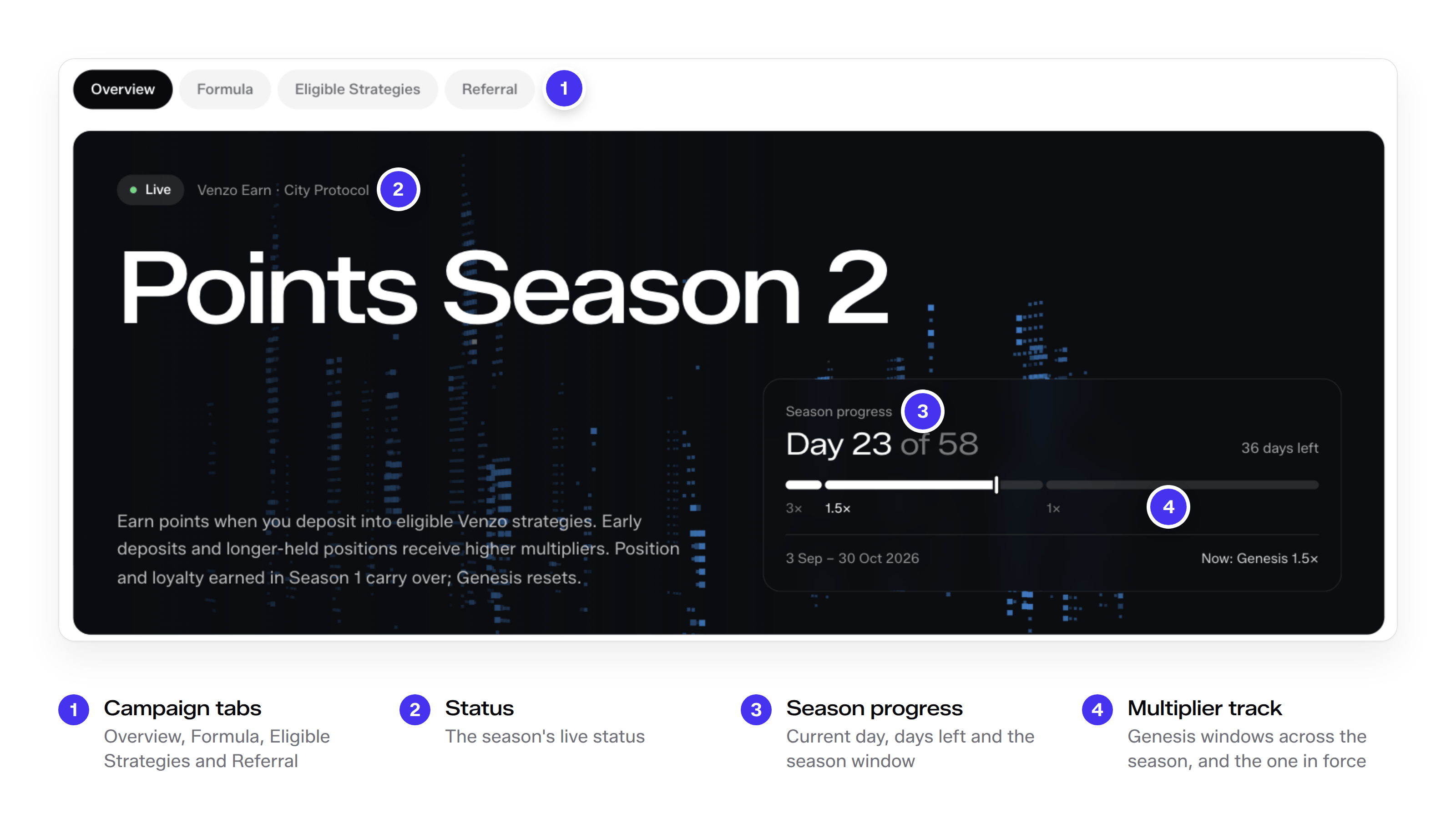
<figure><img src="https://3297077862-files.gitbook.io/~/files/v0/b/gitbook-x-prod.appspot.com/o/spaces%2FJxNp2waFk6hg1G4lEQZu%2Fuploads%2FW0bY7kMExBGozp4IyRwG%2Fui-points-season.png?alt=media" alt="The Campaign page&#x27;s Points Season 2 hero with the tab row and the season progress card with its multiplier track"><figcaption><p>Campaign opens on the current Points season and its progress.</p></figcaption></figure>

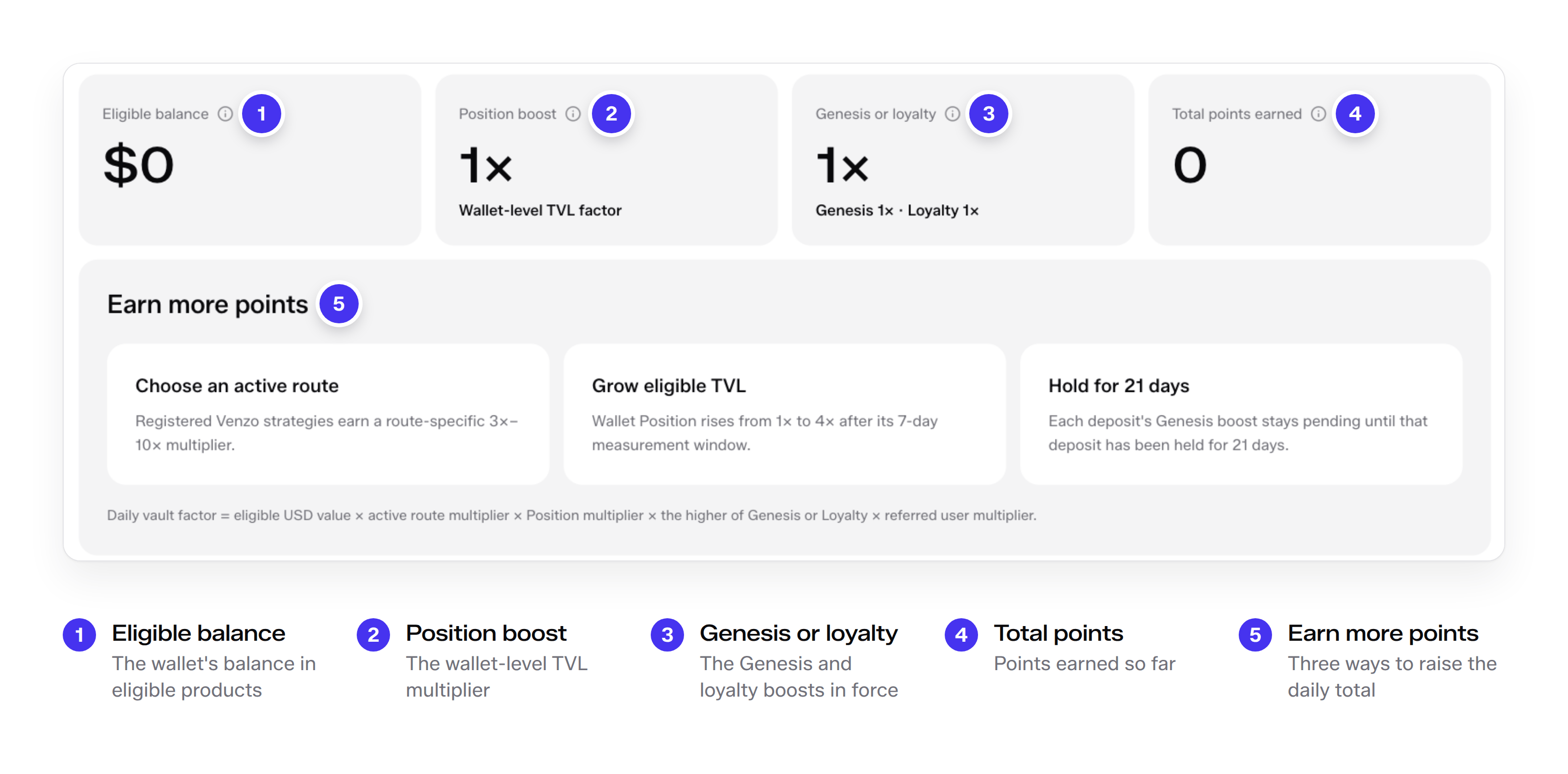
The Overview tab opens on the season's status and a progress card with the current day, the days left, the season window and a multiplier track that marks each Genesis window and the one in force. Below it, four cards show the connected wallet's eligible balance, position boost, Genesis or loyalty boost and total points. Earn more points names the three ways to raise the daily total: choose an eligible product with a higher vault multiplier, grow eligible TVL, and hold each deposit long enough for its Genesis boost to be confirmed.

<figure><img src="https://3297077862-files.gitbook.io/~/files/v0/b/gitbook-x-prod.appspot.com/o/spaces%2FJxNp2waFk6hg1G4lEQZu%2Fuploads%2FMrE2offMuB6rv4ScnOEM%2Fui-points-stats.png?alt=media" alt="Four cards for eligible balance, position boost, Genesis or loyalty and total points, above three ways to earn more points"><figcaption><p>The wallet's points at a glance, and the three ways to raise them.</p></figcaption></figure>

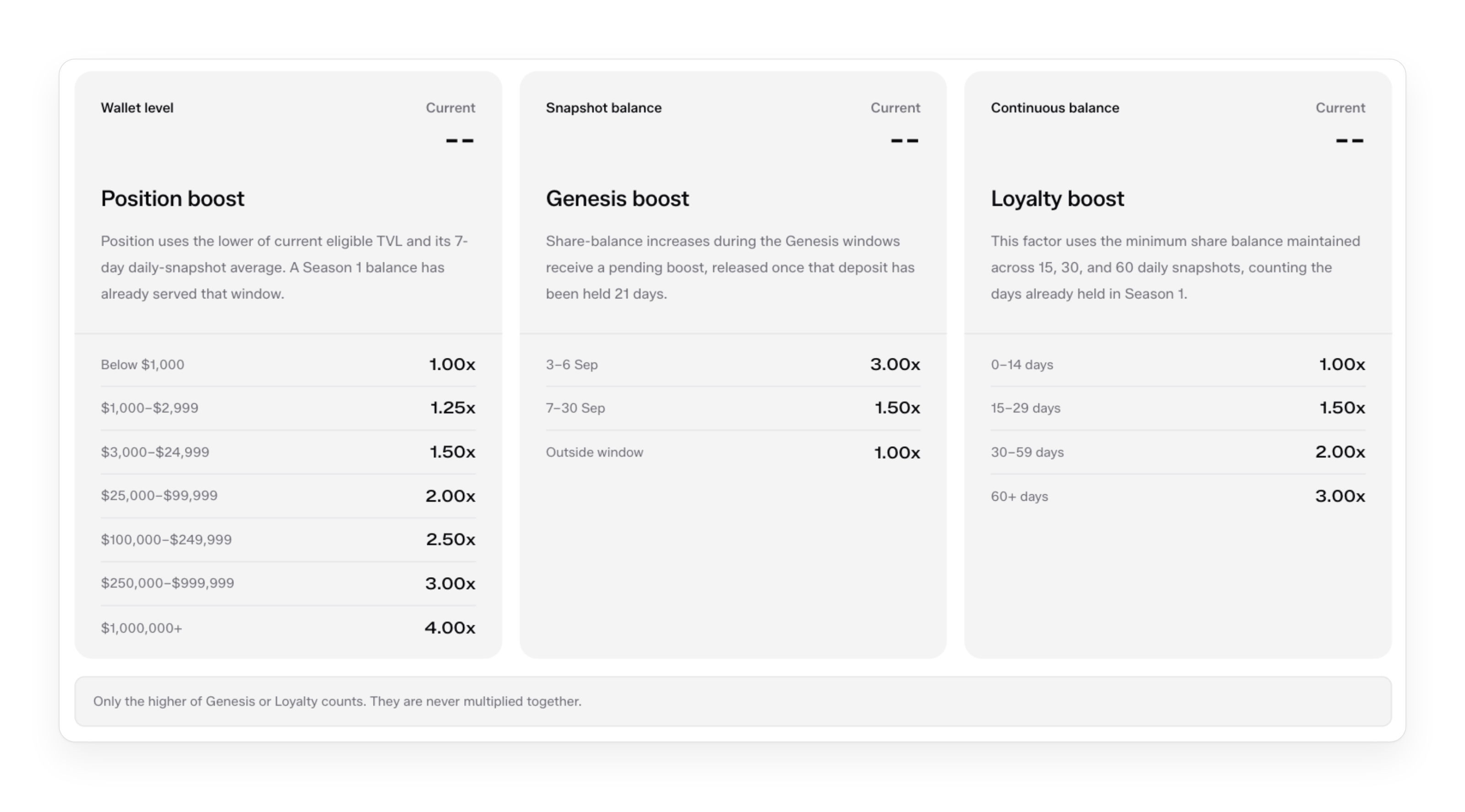
The Formula tab sets out the daily points formula, calculated from a 12:00 UTC snapshot of the balance in each vault. Each factor carries its range, what sets it and its value in a worked example. The worked example gives the same Daily Vault Factors as the example in the [Season 2 guide](/docs/guides/polis-points/season-2-polis-points.md). Below the formula, three tables give the position boost by wallet-level TVL, the Genesis boost by entry window and the loyalty boost by continuous holding period.

<figure><img src="https://3297077862-files.gitbook.io/~/files/v0/b/gitbook-x-prod.appspot.com/o/spaces%2FJxNp2waFk6hg1G4lEQZu%2Fuploads%2FHjWDU2YfEdAryPvtBiw8%2Fui-points-formula.png?alt=media" alt="The Formula tab&#x27;s factor table and the worked daily total"><figcaption><p>The Formula tab. Each factor shows its range, what sets it and its value in the worked example.</p></figcaption></figure>

<figure><img src="https://3297077862-files.gitbook.io/~/files/v0/b/gitbook-x-prod.appspot.com/o/spaces%2FJxNp2waFk6hg1G4lEQZu%2Fuploads%2Fx8pHVZMFUSfnHFj8Dx4L%2Fui-points-boosts.png?alt=media" alt="Three boost tables: position boost by wallet TVL, Genesis boost by entry window and loyalty boost by holding period"><figcaption><p>The position, Genesis and loyalty boost tables.</p></figcaption></figure>

The Eligible Strategies tab lists every product that earns points, with what a participant holds in it, the vault's Receipt Token or the portfolio for an OTP, its network and its points multiplier, and a View vault link to its product page. Participants earn points only on products available in their jurisdiction.

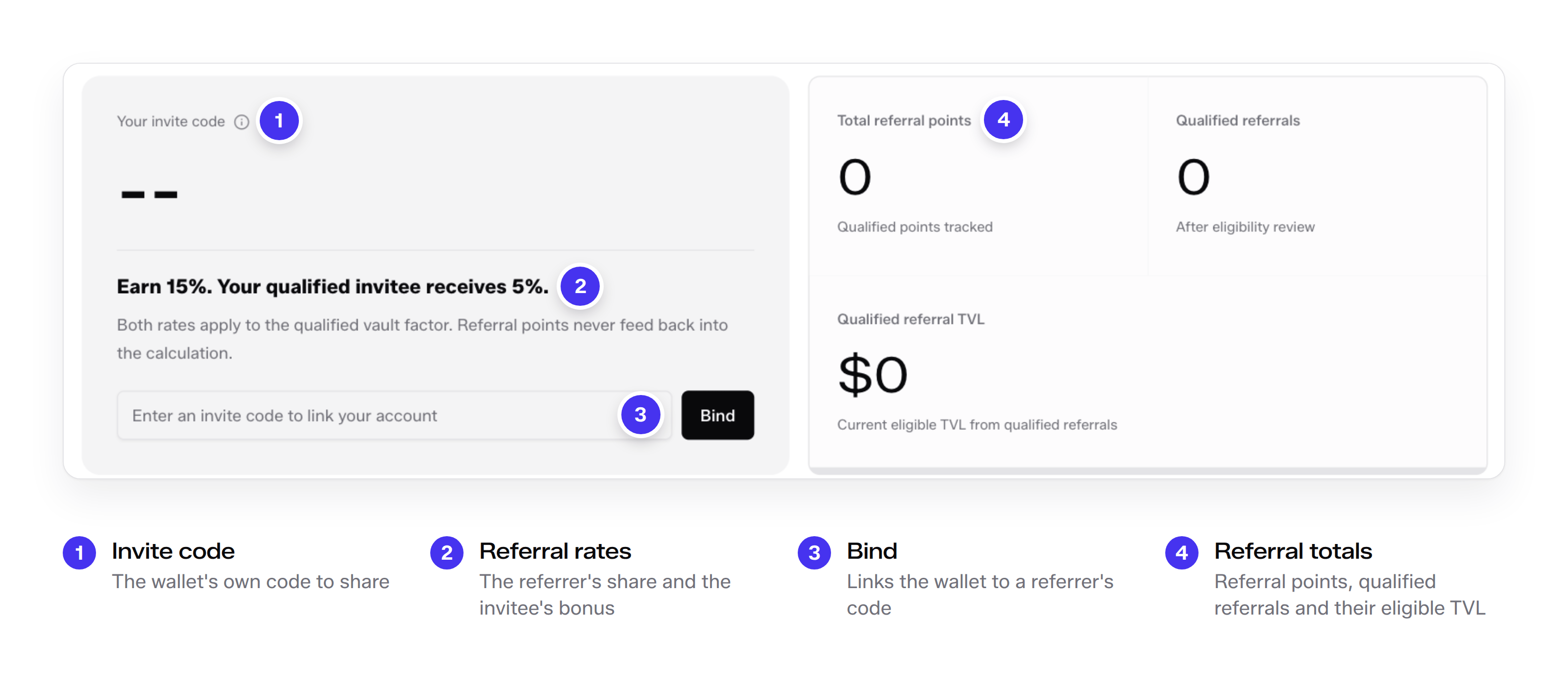
The Referral tab holds the wallet's invite code and a field to bind a referrer's code. The referral component is single-layer: a referrer earns a share of each qualified invitee's Vault Factors and the qualified invitee receives a bonus on their own, at the rates the season's rules set, and referral points never feed back into the calculation. The tab totals the wallet's referral points, its qualified referrals and their eligible TVL. Residents of the Republic of Korea earn points only for their own eligible positions: referral and promotional quest points are not available to them.

<figure><img src="https://3297077862-files.gitbook.io/~/files/v0/b/gitbook-x-prod.appspot.com/o/spaces%2FJxNp2waFk6hg1G4lEQZu%2Fuploads%2FoJoOEH80GfmjzAqHQlzr%2Fui-points-referral.png?alt=media" alt="The Referral tab with the invite code, the referral rates, the bind field and the referral totals"><figcaption><p>The Referral tab.</p></figcaption></figure>

The rules of each season, with every multiplier table, are set out in [Polis Points](/docs/guides/polis-points.md). The current Polis Points policy is published on the City Protocol website.

## Proof of reserves

Proof of Reserves, in the navigation, opens an independent proof-of-solvency dashboard. Its top row totals the protocol: the reserves verified across the live vaults, the supply of vault tokens in US dollars, the collateral ratio, which is reserves divided by supply, and the number of live vaults it covers. Below, a selector switches to one vault and shows that vault's reserves, supply and collateral ratio, with supply and reserves side by side and the surplus of reserves over supply. The dashboard retrieves its data at a fixed interval and shows the time of the most recent retrieval.

The master dashboard and the product-level dashboards are listed in [Audits](/docs/security/security-and-risk/audits.md).

## Documents and security

Documents, in the navigation, links out to the documentation, and every vault page links to its own Risk Disclosure, Documents, Legal Terms and Audits. The audit reports for City Protocol's components and for Delta-Neutral Prime USD are collected in [Audits](/docs/security/security-and-risk/audits.md), and the contract-level controls behind every vault are set out in [Contract security](/docs/security/security-and-risk/contract-security.md). Live vault data is also published at [dune.com/cityprotocol/venzo-vaults](https://dune.com/cityprotocol/venzo-vaults).

{% hint style="warning" %}
Access to Venzo is blocked by geofencing for the restricted and sanctioned jurisdictions listed in the [Terms & Conditions](/docs/legal/terms-and-conditions.md), and each product applies its own eligibility requirements at subscription.
{% endhint %}